Back to Blog
Pillar Masterclass
• 12 Min Comprehensive Read

The Complete Guide to Every QR Code Type in 2026: Working, Use Cases & Best Practices

Whether you are designing restaurant menus, launching billboard campaigns, networking with digital business cards, or collecting customer feedback — discover how every QR code type works, where to deploy them, and how to eliminate reprint costs forever.

AQ
Alpha Qr Architecture Team
August 2026
The Complete Guide to Every QR Code Type in 2026: 9 Real-World Scenarios Connected by Alpha QR

Why QR Code Type Selection Matters

A QR code is not just a black-and-white image; it is an active digital gateway. Choosing the correct type determines whether your users experience a seamless 1-tap contact save, an instant PDF menu load, or an interactive feedback loop. With Alpha QR's dynamic routing engine, you can print physical codes on menus, billboards, or business cards once and update their contents, destination links, and forms forever without spending a single dollar on reprinting.

Dynamic Engine Architecture
Zero Reprint Infrastructure
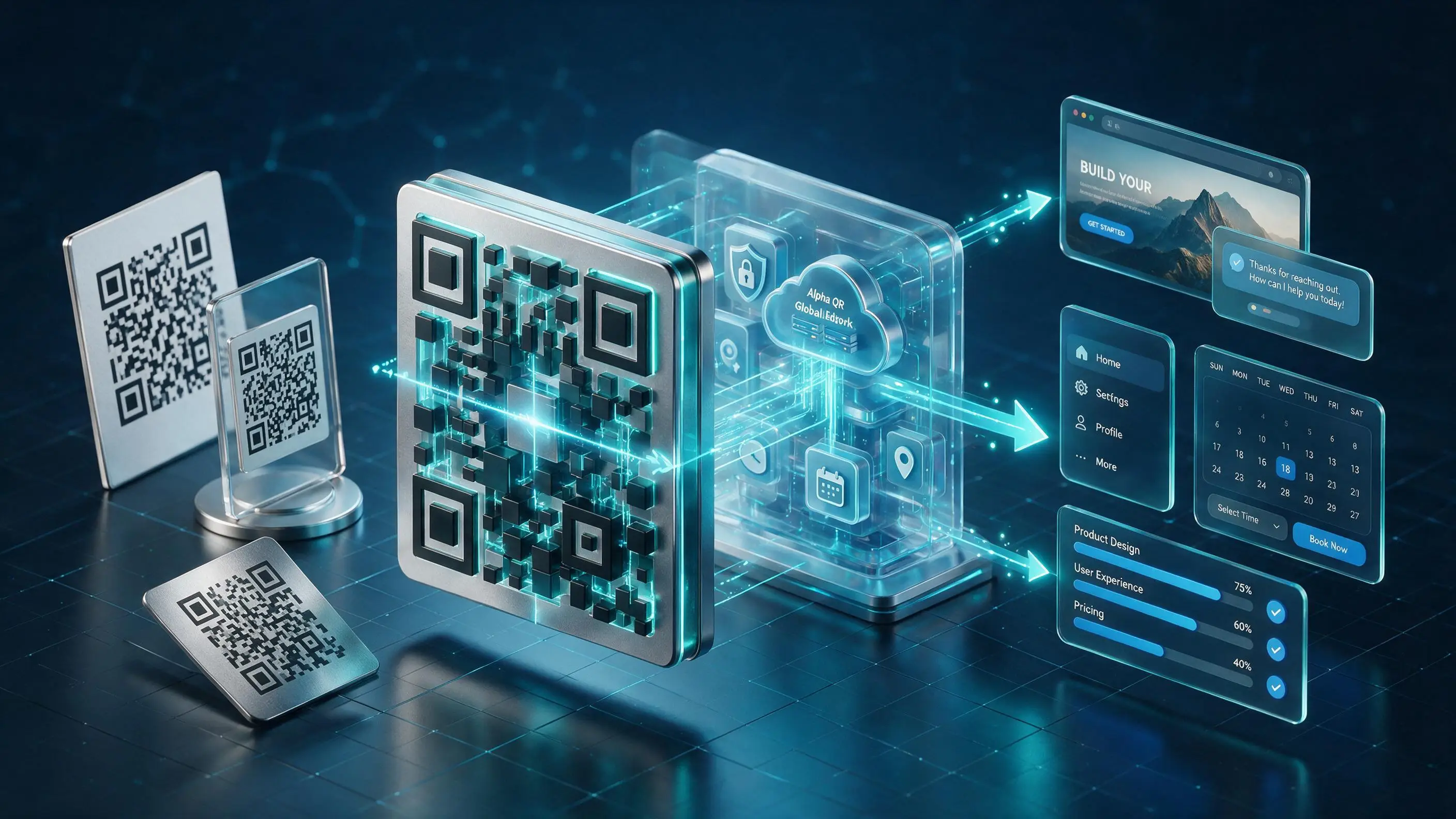
Anatomy of a Dynamic QR Code - Physical scan to cloud routing and instant mobile applications
Figure 1: Anatomy of a Dynamic QR Code — How Alpha QR decodes physical scans into active cloud services, real-time routing, and instant mobile experiences.
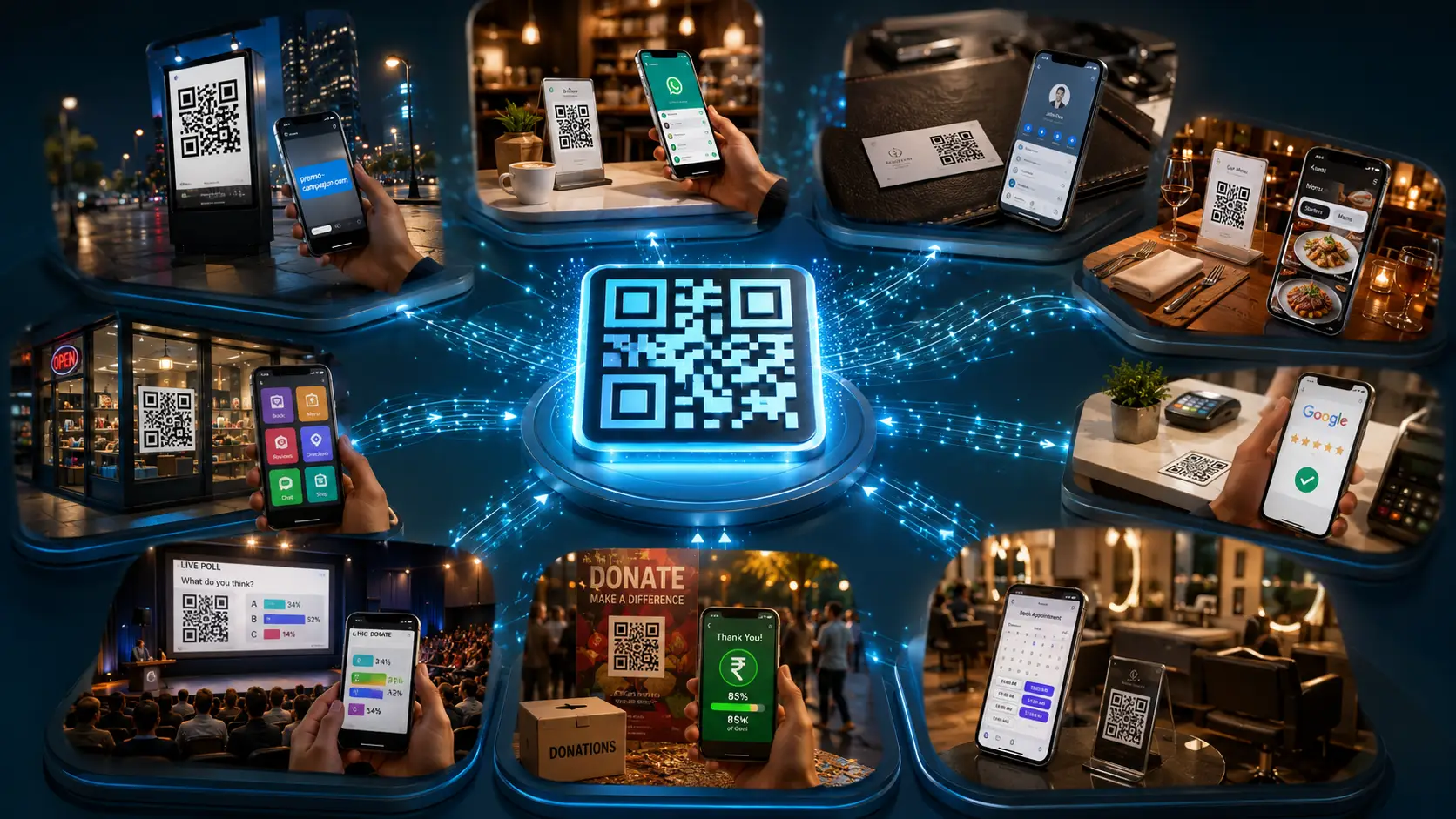
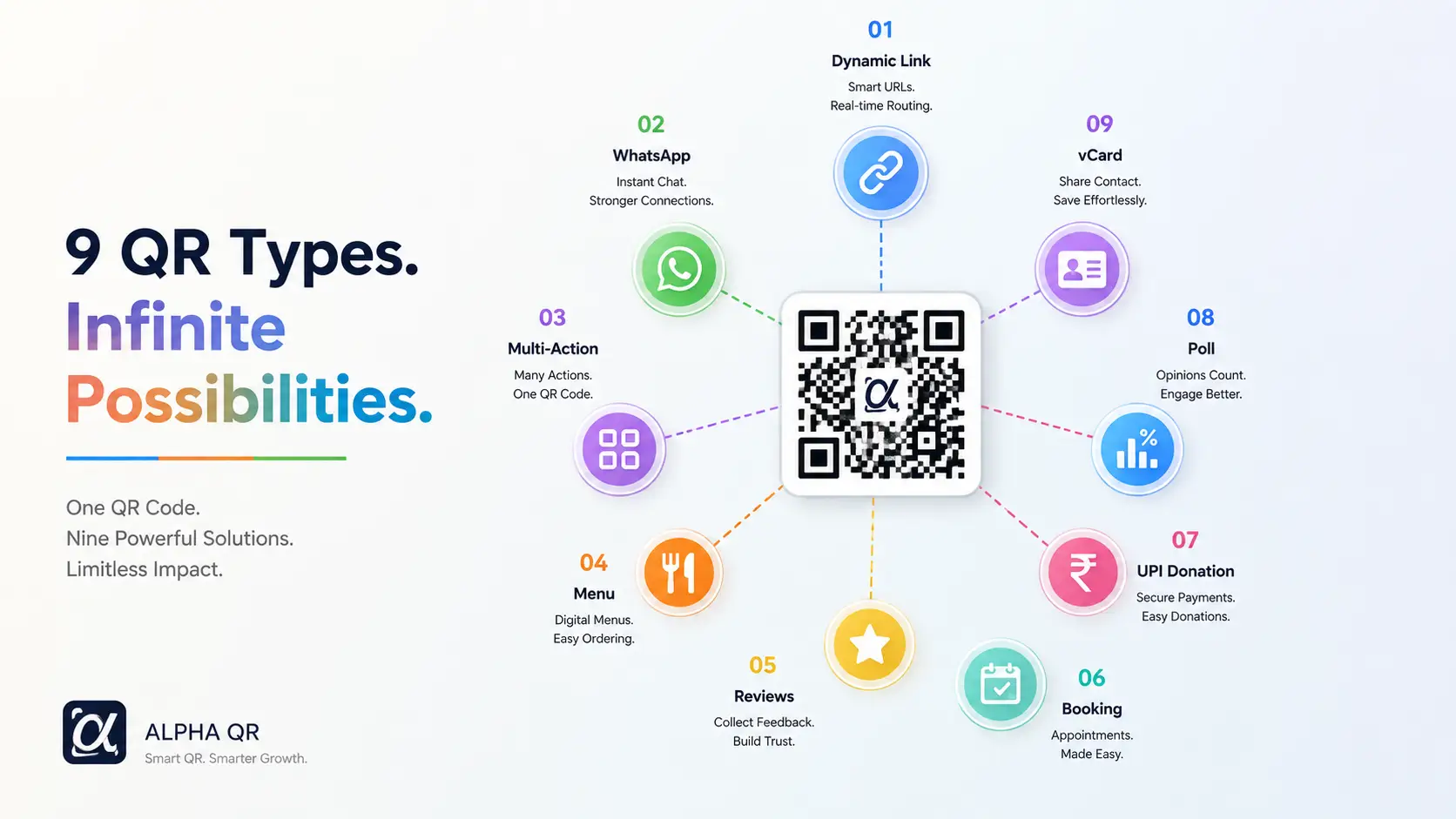
Complete 9-Engine Ecosystem Map
Types 01 – 09
9 QR Types Infinite Possibilities - Alpha QR Complete Architecture Map
Type 02 • Direct Connect

WhatsApp Direct Chat QR

1-Tap Direct Chat Without Contact Saving

Create WhatsApp Direct Chat QR

What It Is & When to Use

Connect customers instantly to your sales or support WhatsApp chat with a pre-filled initial message and zero friction.

How It Works Under the Hood

The QR code generates a dynamic deep-link standard (`wa.me` / `api.whatsapp.com`) that launches the native WhatsApp client on mobile or web browsers directly, pre-populating target phone numbers and custom greeting messages.

How to Create with Alpha QR (Step-by-Step)

  1. 1Choose 'Link' and select 'WhatsApp Direct' in the Quick Dock.
  2. 2Enter your business WhatsApp phone number with country code.
  3. 3Optionally specify a pre-filled starting text message (e.g. 'Hi! I want to inquire about your product.').
  4. 4Download your styled QR code for storefront stickers or product packages.

Real-World Applications & Deployment Places

Local Service Providers

Printed on store windows so walking customers can open instant WhatsApp inquiry chats.

Product Packaging

Warranty inserts enabling 1-tap customer support and replacement queries.

Real Estate Agents

Yard sign flyers allowing interested buyers to text agents directly.

Key Advantages & ROI

  • Eliminates manual contact saving typing steps.
  • Boosts lead conversion by 3x compared to generic email contact forms.
  • Works smoothly across mobile WhatsApp app and desktop WhatsApp Web.
Pro TipAdd a polite pre-filled initial message so users know what to send when WhatsApp opens.
Type 03 • Smart Mobile Hub

Multi-Action / Link-in-Bio QR

Linktree-Style Centralized Brand Portal

Create Multi-Action / Link-in-Bio QR

What It Is & When to Use

Direct physical traffic to an interactive mobile hub featuring custom call-to-action buttons, promotional banners, social channels, and live links.

How It Works Under the Hood

Scanners arrive on a lightning-fast responsive landing page hosting your curated button links. Each button can route to different destinations (e.g. WhatsApp, Store, Directions, Catalog) with real-time per-button click tracking.

How to Create with Alpha QR (Step-by-Step)

  1. 1Select 'Multi-Action' in the QR creator.
  2. 2Add your brand name, description, and header banner.
  3. 3Create unlimited action buttons (e.g. 'Book a Table', 'Shop New Arrivals', 'Get Directions', 'Chat on WhatsApp').
  4. 4Choose icons for each button, style your theme palette, and download.

Real-World Applications & Deployment Places

Local Businesses & Salons

Storefront window decals offering buttons for Booking, Menu, Instagram, and Google Reviews.

Influencers & Brands

Event booths distributing a single QR code connecting to store, podcast, YouTube, and Discord.

Real Estate Agencies

Yard signs with buttons for 'Virtual Tour', 'Mortgage Calculator', 'Agent Phone', and 'Floorplan'.

Key Advantages & ROI

  • Consolidates multiple campaigns into one permanent physical QR code.
  • Granular click tracking: discover which button drives the highest mobile engagement.
  • Zero app installs needed: works seamlessly inside native mobile browsers.
Pro TipOrder your most important call-to-action button at the very top with an attention-grabbing accent color.
Type 04 • Digital Menu

Restaurant Menu & Digital Catalog QR

Categorized Menu Items & Direct WhatsApp Ordering

Create Restaurant Menu & Digital Catalog QR

What It Is & When to Use

Display digital food menus, cafe items, or product catalogs with categorized sections, item prices, dietary tags, photos, and direct WhatsApp checkout.

How It Works Under the Hood

Scanners view a sleek mobile menu card with instant search, category navigation tabs, item tags (Bestseller, Chef Special, Vegan), and optional 1-tap WhatsApp order buttons.

How to Create with Alpha QR (Step-by-Step)

  1. 1Select 'Interactive' and choose 'Menu / Catalog'.
  2. 2Enter cafe/restaurant name, currency, and contact numbers.
  3. 3Add category groups (e.g. Breakfast, Pastries, Drinks) and populate items with prices and descriptions.
  4. 4Set your brand background (solid, pattern, video, or background image) and launch.

Real-World Applications & Deployment Places

Restaurants & Cafes

Tabletop acrylic stands replacing traditional paper menus with instant zero-touch digital menus.

Boutique Retail

In-store shelf QR codes displaying digital product catalogs with live stock status.

Hotels & Room Service

In-room bedside cards for instant 24/7 room service dining orders.

Key Advantages & ROI

  • Zero re-printing costs when updating prices or seasonal items.
  • Instant multi-currency support (USD, INR, EUR, GBP, AED, SGD, AUD, CAD).
  • 1-Click order dispatch straight to kitchen/reception WhatsApp.
Pro TipUse dietary tag badges (e.g., Vegan, Gluten-Free, Bestseller) to help diners browse fast.
Type 05 • Reputation Booster

Google & Trustpilot Reviews Booster QR

5-Star Ratings & Direct Google Maps Redirect

Create Google & Trustpilot Reviews Booster QR

What It Is & When to Use

Collect positive 5-star customer reviews on Google Maps or Trustpilot while filtering feedback internally before bad reviews go public.

How It Works Under the Hood

Scanners rate their experience on an interactive star scale. Happy customers (4-5 stars) are directed straight to your official Google Maps review submission link, while lower ratings trigger a private feedback form sent directly to management.

How to Create with Alpha QR (Step-by-Step)

  1. 1Select 'Interactive' and pick 'Google Reviews'.
  2. 2Enter your business name and paste your direct Google Maps place review URL.
  3. 3Customize rating labels and optional private feedback fields.
  4. 4Print review booster stickers for checkout counters, receipts, or exit doors.

Real-World Applications & Deployment Places

Retail Stores & Restaurants

Printed on receipts and billing counters urging happy shoppers to leave instant Google reviews.

Hotels & Spas

Checkout desk stands boosting local SEO search rankings with positive guest reviews.

Healthcare & Clinics

Reception desk displays collecting patient ratings for local search prominence.

Key Advantages & ROI

  • Multiplies Google Maps review velocity by 5x.
  • Protects public brand reputation with built-in sentiment rating routing.
  • Direct Google Maps integration for 1-tap review posting.
Pro TipOffer a small incentive like 'Scan to rate us & enter our monthly free voucher draw!' to maximize scan volume.
Type 06 • Appointment Desk

Service Booking & Appointment Desk QR

Client Slot Booking & Auto-Confirmation

Create Service Booking & Appointment Desk QR

What It Is & When to Use

Enable clients to schedule appointments, salon sessions, consultations, or service slots straight from their mobile browser.

How It Works Under the Hood

Scanners open a booking desk landing page where they pick available dates, select time slots, enter contact details, and submit appointment requests with automated notification alerts.

How to Create with Alpha QR (Step-by-Step)

  1. 1Select 'Interactive' and choose 'Appointments / Booking'.
  2. 2Set service title, duration (e.g. 30 mins), price, and operational timezone.
  3. 3Define booking rules, working hours, and confirmation messaging.
  4. 4Embed on business cards, brochures, or clinic front desks.

Real-World Applications & Deployment Places

Beauty Salons & Spas

Front desk or window posters enabling clients to book hair or spa slots 24/7.

Consultants & Lawyers

Business cards letting prospective clients lock in introductory consultation calls.

Automotive Workshops

Service bay cards for scheduling annual car maintenance slots.

Key Advantages & ROI

  • Automates client scheduling without receptionist phone tag.
  • Prevents double bookings with slot duration controls.
  • Mobile-friendly date & time selector.
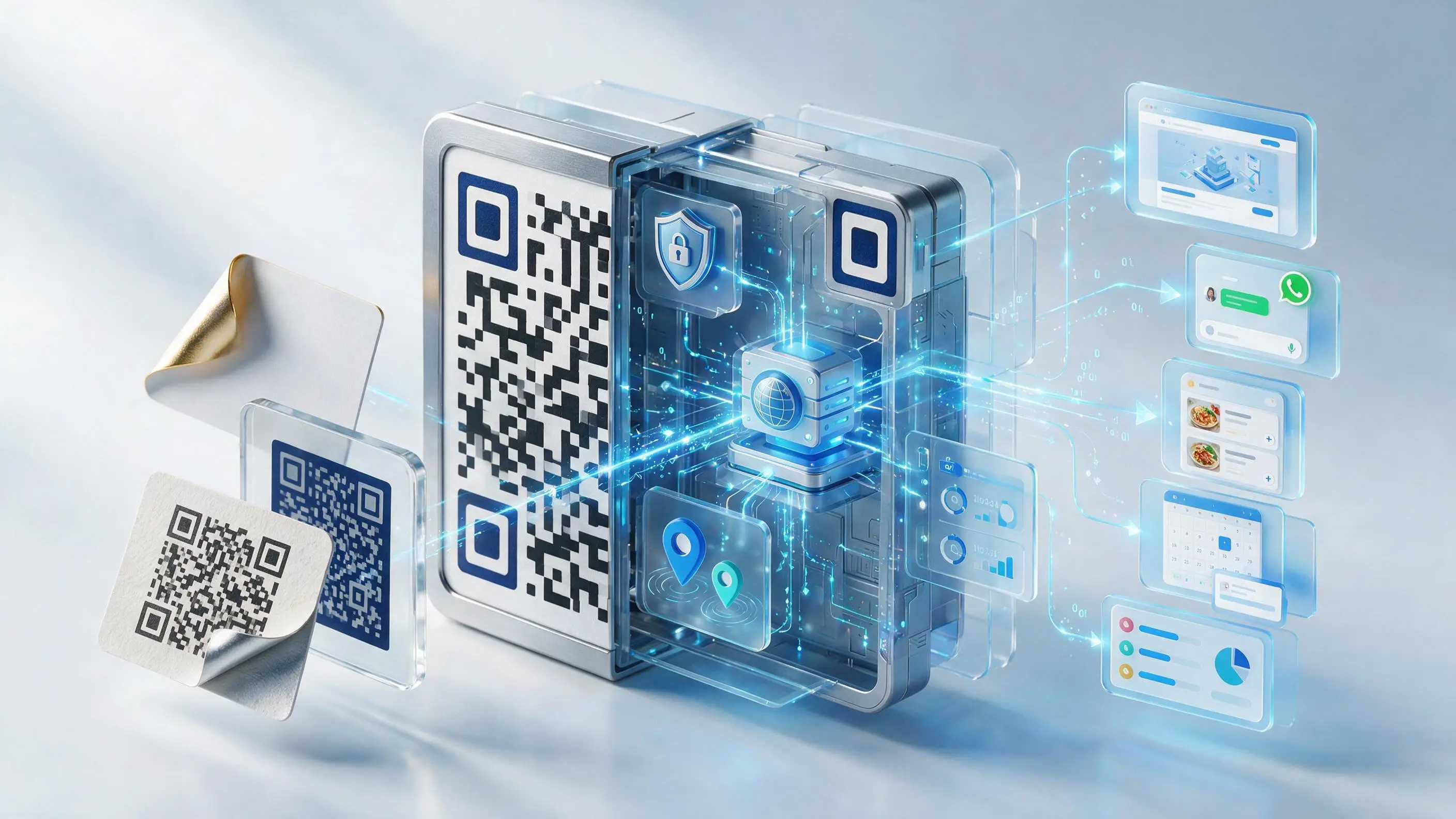
Interactive Appointment Booking Desk and Cloud Routing Engine
Figure 2: Alpha QR Cloud Booking Engine — Transforming physical standees into 24/7 calendar slot reservations.
Pro TipSet realistic slot buffer durations to keep your calendar organized.
Type 07 • Crowdfunding

UPI Donation & Crowdfunding Tracker QR

Direct UPI Payments & Live Goal Progress Telemetry

Create UPI Donation & Crowdfunding Tracker QR

What It Is & When to Use

Collect direct UPI payments for charities, temples, relief funds, or creators with live progress bars and supporter walls.

How It Works Under the Hood

Scanners view a campaign card showing target goals vs funds raised. Tapping 'Donate' opens UPI apps (Google Pay, PhonePe, Paytm, BHIM) with pre-filled VPA addresses.

How to Create with Alpha QR (Step-by-Step)

  1. 1Select 'Interactive' and choose 'UPI Donation'.
  2. 2Enter campaign title, organizer name, target goal amount, and beneficiary UPI VPA ID.
  3. 3Optionally enable supporter shoutout walls and custom donor message fields.
  4. 4Print on donation boxes, event banners, or relief posters.

Real-World Applications & Deployment Places

NGOs & Non-Profits

Fundraising flyers tracking campaign milestones in real time.

Temples & Cultural Centers

Tabletop donation stands supporting instant 1-tap UPI offerings.

Creators & Artists

Performance stage banners collecting tips and community support.

Key Advantages & ROI

  • Zero gateway transaction fees when using direct UPI payments.
  • Live visual goal progress bar encourages higher donor participation.
  • Supporter shoutout wall fosters community engagement.
Pro TipKeep your UPI ID verified and accurate before printing large campaign banners.
Type 08 • Audience Poll

Live Opinion Poll & Audience Voting QR

Real-Time Animated Percentage Bars & Duplicate Prevention

Create Live Opinion Poll & Audience Voting QR

What It Is & When to Use

Engage live audiences at events, lectures, or stores with instant question polls featuring real-time percentage visualizations.

How It Works Under the Hood

Voters scan the code, tap their preferred option, and immediately see live animated voting statistics with local browser duplicate vote checks.

How to Create with Alpha QR (Step-by-Step)

  1. 1Select 'Interactive' and choose 'Live Poll'.
  2. 2Type your poll question and list 2 to 6 vote options.
  3. 3Enable instant result visibility or duplicate voting controls.
  4. 4Display on presentation slides, event screens, or poster boards.

Real-World Applications & Deployment Places

Conferences & Seminars

Keynote presentation slides collecting live audience opinion votes.

Education & Schools

Classroom screens holding pop quizzes and student opinion polls.

Retail Product Testing

In-store voting stands asking shoppers to vote for new product flavors.

Key Advantages & ROI

  • Instant engagement: zero registration or app downloads required for voters.
  • Live animated percentage bar charts.
  • Duplicate vote prevention ensures clean survey results.
Pro TipDisplay the poll QR on a big screen during live talks to maximize audience participation.
Type 09 • Identity & Networking

Personal Card / vCard Contact QR

1-Tap Contact Saving & Digital Portfolio

Create Personal Card / vCard Contact QR

What It Is & When to Use

Empower professionals, sales executives, and creators with a dynamic bio profile that downloads a `.vcf` contact file straight to the smartphone's address book.

How It Works Under the Hood

The QR code links to a beautifully styled mobile micro-page (`/scan/{id}`). With a single tap on 'Save Contact', an iOS/Android native `.vcf` file is parsed by the smartphone, populating names, phone numbers, emails, company roles, social handles, and profile avatars directly into contacts.

How to Create with Alpha QR (Step-by-Step)

  1. 1Choose 'Personal QR' in the Type selector.
  2. 2Enter your full name, job title, company name, bio, direct phone number, and official email.
  3. 3Attach your social media handles (LinkedIn, GitHub, Instagram, Twitter/X, Discord, YouTube).
  4. 4Upload your professional headshot or company avatar, customize the theme gradient, and save.

Real-World Applications & Deployment Places

Corporate & Sales Reps

Printed on NFC metal business cards or badges for frictionless lead generation at conferences.

Freelancers & Creators

Placed on portfolios, email signatures, or presentations to connect across multiple social handles.

Medical & Legal Experts

Printed on clinic reception desks allowing patients and clients to save emergency clinic contacts.

Key Advantages & ROI

  • Eliminates manual contact typing: zero typos in phone numbers or emails.
  • Always up-to-date: changing phone numbers or addresses in your dashboard updates your card for all previous scanners.
  • Integrated social hub: centralizes portfolio, GitHub, LinkedIn, and payment links in one place.
Pro TipAdd a high-contrast square profile photo (at least 400x400px) to make your mobile digital business card visually stunning.

Static vs. Dynamic QR Codes: Quick Comparison

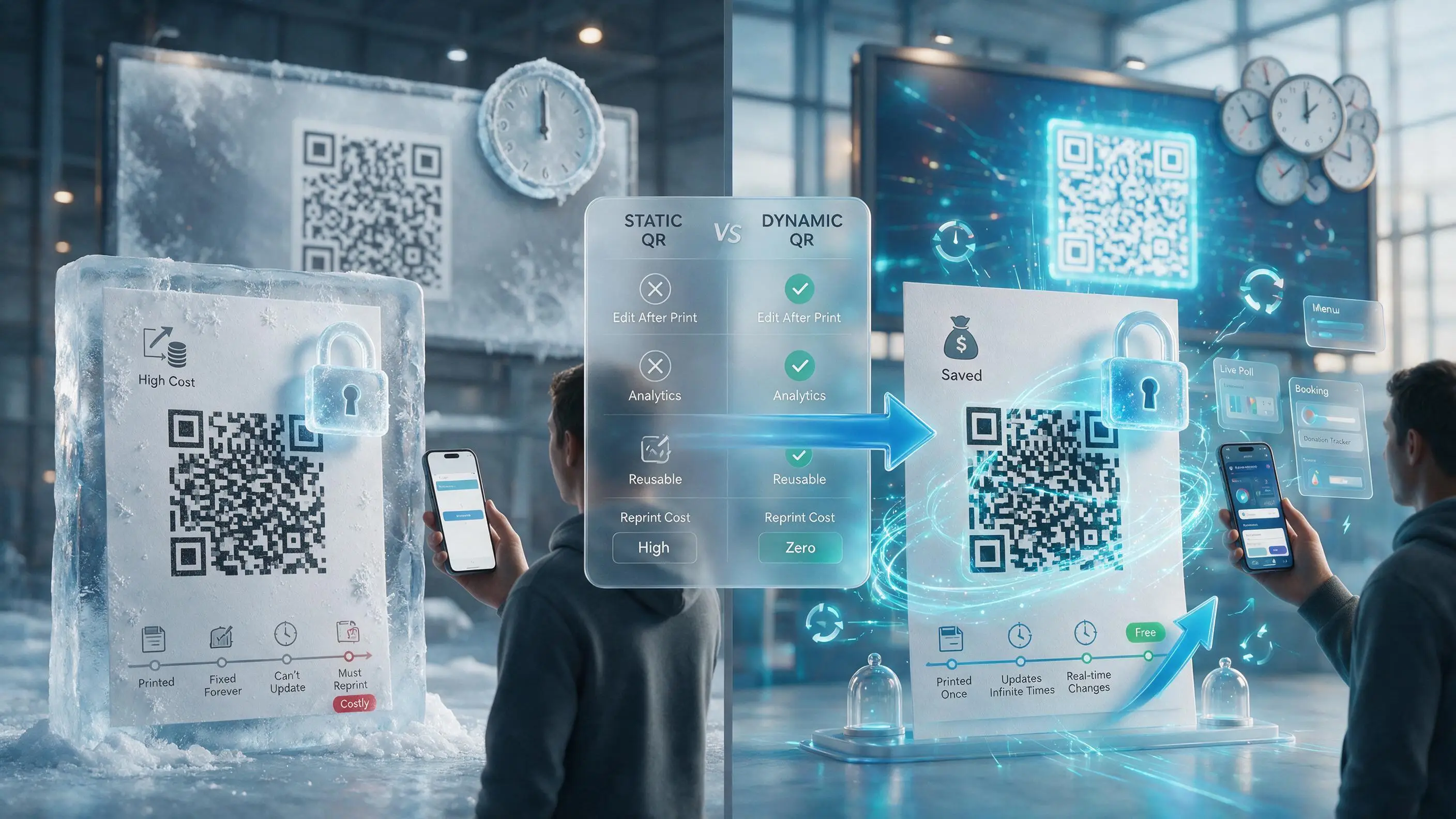
Static QR vs Dynamic QR Comparison: Costly Frozen Reprints vs Free Infinite Real-Time Updates
FeatureStatic QR CodesAlpha QR Dynamic Codes
Edit Destination After Printing❌ Impossible (Hardcoded)✅ Unlimited Real-Time Updates
Scan Analytics & Geolocation❌ None✅ Full Real-Time Insights
Visual Code DensityDense (Hard to scan small)Clean & High-Contrast (Easy scan)
QR Recycling & Reclaim❌ Waste printed paper✅ Reclaim & Repoint Forever

Ready to Build Your First Dynamic QR Code?

Join thousands of businesses, restaurants, and creators using Alpha QR to power their physical-to-digital experiences with zero reprinting costs.